

Visual production scheduling helps production planners understand, adjust, and manage manufacturing schedules through interactive graphical views and scheduling tools.
A production schedule may look workable at the start of the day. Then a machine becomes unavailable, a material delivery is delayed, or an urgent order takes priority. Changing one operation can affect several others. The challenge is not simply finding a new time slot, but understanding what the change means for resources, other orders, and delivery dates.
Visual production scheduling goes beyond making production plans easier to see. A graphical schedule helps planners understand workloads, identify potential problems, and recognize where changes are needed. Interactive scheduling tools allow them to adjust operations and review the consequences. Finite-capacity scheduling can also help calculate feasible schedules based on resource capacity and other constraints.
Here are eight reasons why these capabilities matter in day-to-day manufacturing.
1. Make complex production schedules easier to understand
Several production orders are scheduled for the same week, each with multiple operations and different resource requirements. Before making a decision, the planner needs to understand how the work fits together.
A Gantt chart displays operations along a timeline, showing their scheduled timing, sequence, and assigned resources. Production order views help planners follow the operations within an order, while resource-oriented views show which activities are assigned to individual machines and work centers. Instead of opening production orders one by one, the planner can review the relevant activities together and see where they overlap. This makes it easier to understand the current schedule before deciding what needs to change.
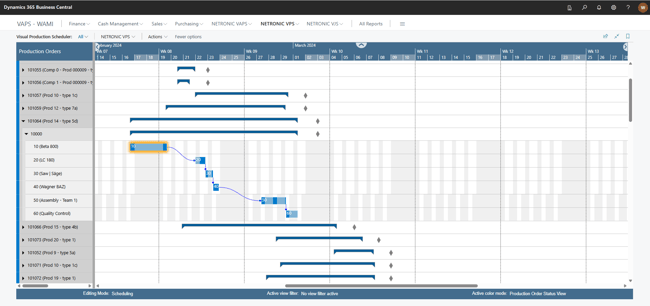 VPS in Business Central: a production order expanded into its operations,with dependencies shown across work centers.
2. Adjust production schedules more easily
An important production order needs to start earlier than planned. The planner can see where it sits in the schedule, but identifying a possible time slot is only the first step. The schedule also needs to be adjusted.
Netronic's Visual Production Scheduler (VPS), part of the Boyum IT Solutions portfolio, allows planners using Microsoft Dynamics 365 Business Central to adjust operation timing through drag and drop. VPS works within Business Central's scheduling logic and displays the resulting schedule, allowing planners to review the changes and determine whether further adjustments are needed.
For more complex scheduling requirements, Netronic's Visual Advanced Production Scheduler (VAPS) combines interactive adjustments with finite-capacity scheduling calculations. When a planner moves an operation, VAPS can recalculate other affected operations where required to respect configured scheduling constraints. Planners can also use scheduling instruments for specific tasks, such as adding a new production order on allowed alternative machines without disturbing the existing schedule, or filling idle times.
Both solutions allow planners to move from identifying a scheduling problem to adjusting the schedule and reviewing the consequences. VAPS adds scheduling assistance for more complex situations, while the planner remains responsible for scheduling priorities and decisions.
3. Identify scheduling problems earlier
A production order is due on Friday, but its scheduled operations now extend into the following week. Unless the planner notices the conflict, the expected completion date may remain unrealistic.
Visual warnings help draw attention to scheduling issues that need review. In VPS, planners can identify late production orders and capacity overloads and see the dependencies between operations. The planner can then inspect the affected order, review its remaining operations, and consider whether changes to timing or priorities are possible. Because these warnings reflect the planned schedule and reported progress, timely shop floor reporting keeps them reliable. Spotting a scheduling risk earlier gives planners more opportunity to address it before making delivery commitments or releasing further work.
4. Make better use of available resource capacity
One machine is scheduled for more work than it can complete during a shift, while another suitable machine has available time. The planner needs to determine whether the workload can be distributed differently.
Resource-oriented schedules and capacity views show how operations are assigned over time. They help planners identify overloaded periods, review available capacity, and consider possible adjustments. Business Central already performs production scheduling using routings, operation times, and resource calendars. It uses infinite-capacity scheduling by default, so scheduled workloads can exceed available capacity. Selected work and machine centers can also be configured as capacity-constrained resources.
For manufacturers with more advanced requirements, VAPS adds finite-capacity scheduling, which considers configured resource capacity when calculating operation timing. This helps planners work toward schedules that reflect available production capacity rather than simply displaying the demand placed on it.
5. Respond more effectively to production disruptions
A supplier confirms that a component will arrive two days later than expected. The machine assigned to the affected order may now be available, but other production orders still need to be completed. The planner must decide whether to postpone the affected work, bring another order forward, or revise the sequence of operations.
An interactive visual schedule makes it easier to review the available time and adjust planned activities. For more complex scheduling requirements, VAPS can also use material availability information and predefined alternative machine centers in scheduling decisions. For example, the VAPS availability view looks ahead on material availability and shows missing materials, helping planners identify operations scheduled before their required components are available. Considering both resource capacity and material availability helps planners avoid moving work into a time slot where production cannot realistically begin.
6. Improve coordination between departments
Maintenance is planned for a machine next Thursday. The maintenance team knows when the equipment will be unavailable, but the production planner needs to determine which operations will be affected.
A visual schedule provides a common reference for that discussion. The planner can identify the operations scheduled during the maintenance period and coordinate any necessary changes with the people responsible. The same principle applies when purchasing reports a supply delay or the shop floor reports a resource constraint. Each department contributes information that may require a scheduling decision.
Visual scheduling does not replace established responsibilities or communication processes. It helps teams discuss the same planned activities and understand which decisions need to be coordinated.
7. Make more informed delivery-date commitments
A customer asks whether an order can be delivered several days earlier. Before sales confirms the new date, the production planner needs to assess whether the required operations can fit into the existing schedule.
A visual production schedule shows when those operations are planned and which resources are already committed to other work. The planner can identify what would need to move and which existing orders might be affected. With VAPS, which considers finite capacity and material availability, planners can also assess the feasibility of proposed dates against those constraints.
Visual scheduling cannot guarantee that production will proceed exactly as planned. It does, however, provide a clearer basis for discussing delivery dates and the changes required to meet them.
8. Evaluate alternative schedules before making changes
An urgent order has to be accommodated, but there is more than one possible response. The planner could give it priority on the existing machine, assign suitable operations to an alternative resource, or revise working time.
Each option has different consequences for other production orders. VAPS supports production schedule simulations, allowing planners to explore alternative scenarios without immediately changing the schedule used for execution. For example, the planner can compare the impact of prioritizing the urgent order with a scenario that uses an alternative machine center. The results help reveal which existing operations would move and how resource workloads would change.
There is rarely one universally best production schedule. Simulations help planners evaluate trade-offs and select an approach that reflects the manufacturer's priorities.
 Take a closer look at Gantt-based visual scheduling
Which scheduling capabilities a manufacturer needs depends on how production is planned and which constraints matter most. Our whitepaper, What Gantt charts add to production and project scheduling, takes a closer look at visual scheduling, resource capacity, task dependencies, and the role of more advanced scheduling functionality, with practical examples from Netronic's solutions for Business Central.

Frequently asked questions about visual production scheduling