

Gantt charts remain useful in production scheduling because they show operations, resources, and timing on a single timeline. When plans change, planners can see which operations are affected, where resources are overloaded, and how adjustments could shift delivery dates.
Production scheduling involves more than creating a plan and expecting it to remain unchanged. An urgent order needs to be brought forward, a machine becomes unavailable, or an operation takes longer than expected. Each change can affect resource workloads, operation sequences, and planned completion dates.
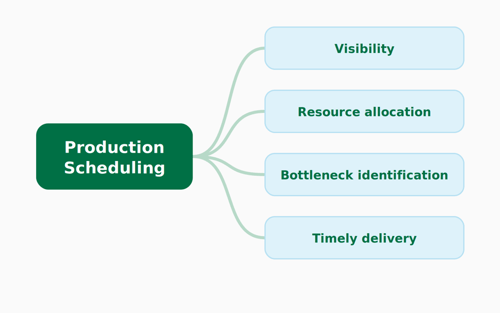 Planning tools in Microsoft Dynamics 365 Business Central help manufacturers organize production requirements, but planners still need to understand how operations, resources, and timing fit together, especially when circumstances change. This is why Gantt charts remain a practical foundation for visual production scheduling. Visual scheduling applications for Business Central, such as Netronic’s Visual Production Scheduler (VPS) and Visual Advanced Production Scheduler (VAPS), build on this familiar approach by combining a graphical overview of production activities with interactive scheduling capabilities, helping planners identify problems, evaluate adjustments, and make more informed scheduling decisions.
Gantt Charts: Valuable Tools for Production Planners
1) Seeing the complete production schedule.
A production planner may know the status of individual orders without having a clear picture of how they fit together. Understanding which operations share resources, what work is scheduled next, and how the current schedule relates to recorded production progress often requires consulting several production orders and records.
A Gantt chart brings scheduled operations into a timeline, showing when work is planned and which resources are assigned. Planners can follow the sequence of operations within an order while also examining workloads across machine centers and work centers. Where the application provides status information, the visual schedule also helps identify orders and operations that need attention.
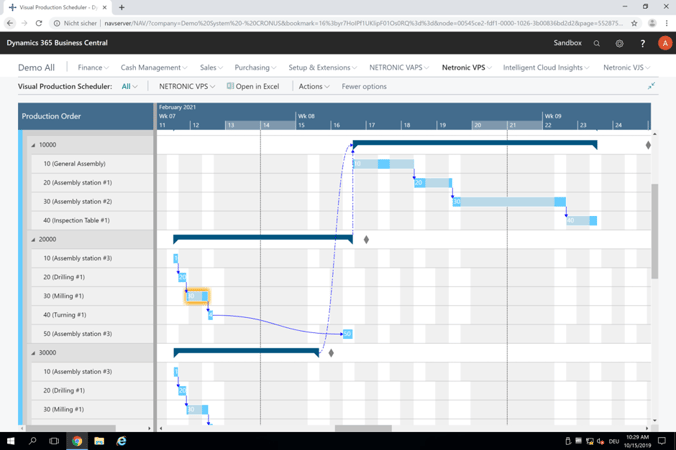
Gantt chart of production orders in Business Central
2) Reallocating resources when plans change.
Suppose an urgent order needs a machine that is already committed for most of the week. Bringing the order forward may require moving other operations, finding a suitable alternative resource, or reconsidering priorities. The planner needs to assess the options without creating unnecessary disruption elsewhere.
This is where interactive visual scheduling goes beyond simply displaying a Gantt chart. Planners can move operations directly on the timeline or reassign them to eligible resources while keeping the surrounding schedule in view. More advanced scheduling functionality may also recalculate affected operations according to defined rules, reducing the need for individual manual adjustments.
3) Identifying capacity bottlenecks and overloaded resources.
Several production orders may look reasonable individually but place too much work on the same machine or work center. Planners need to recognize where scheduled demand exceeds available capacity and whether other suitable resources have room for additional work.
Capacity views complement the Gantt chart by showing scheduled workload against available resource capacity over time. For example, a planner may find that one work center is overloaded on Thursday while another has available capacity later in the week. This helps identify possible adjustments, such as moving an operation to a different time or assigning it to another suitable resource.
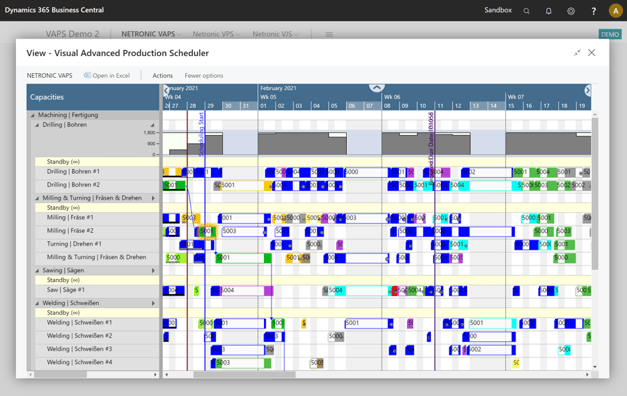
Capacity view showing an overloaded work center in Business Central
4) Understanding the impact on delivery dates.
Moving an operation may resolve an immediate resource conflict but affect the completion of another production order. Bringing urgent work forward can delay activities already scheduled on the same resource, with consequences for planned completion dates and potentially for customer delivery commitments.
A Gantt-based visual schedule helps planners follow operation sequences and compare planned completion dates with relevant due dates. Where supported, visual warnings highlight orders that require attention. Planners can use this information to investigate alternatives and communicate potential changes to colleagues responsible for customer commitments.
However, a visual timeline alone does not establish whether a schedule is feasible. The reliability of planned dates also depends on the underlying production data and how the scheduling application handles relevant constraints, including resource capacity, material availability, and operation sequences.
“The entire process becomes more transparent and easier to plan, especially with regards to completion dates, shipping
companies and the like. You can also plan several weeks into the future and see what will be done when.”
- Julian Ostermeier, Managing Director, Winter & Freis Verpackungen
 Take a closer look at Gantt-based visual scheduling
Which scheduling capabilities a manufacturer needs depends on how production is planned and which constraints matter most. Our whitepaper, What Gantt charts add to production and project scheduling, takes a closer look at visual scheduling, resource capacity, task dependencies, and the role of more advanced scheduling functionality, with practical examples from Netronic's solutions for Business Central.

Frequently asked questions about Gantt charts in production scheduling
Related articles
Is your planning based on Excel? Are you sure that your speadsheet is error free?
Read this blog post!
I also recomment the interview with Lee Cridland from Mercurius: What is good scheduling? or the podcast with Dave Weissman (ArcherPoint) about his experiences with scheduling.