Gantt charts are often used to visualize shift calendars. In this post we share with you questions that had been asked to our support folks in regard of visualizing staff planning with our Gantt controls VARCHART XGantt and VARCHART JGantt .
This is a common customer question: We have no idea how to use shift calendars. Would you please send us a sample about this question?
Here is the NETRONIC answer:
Difference between calendar and shift calendar
"Normal" calendars define working times and work free periods by specifiying rules and exceptions on the basis of days, weeks and so on. Shift calendars, on the contrary, define arbitrary recurring working times and work free periods. You define one "cycle" and VARCHART XGantt will "unroll" this cycle again and again, beginning at the specified start time. Such calendars are typically used in factories, hospitals and alike, where shift work is done. For example: 8 hours early shift (starting at 6:00 a.m.), then 8 hours late shift, then 8 hours night shift (crossing day boundaries!).
Well. That's pretty much straightforward. Let's look a concrete, but more complex example and let's start with a screenshort first:
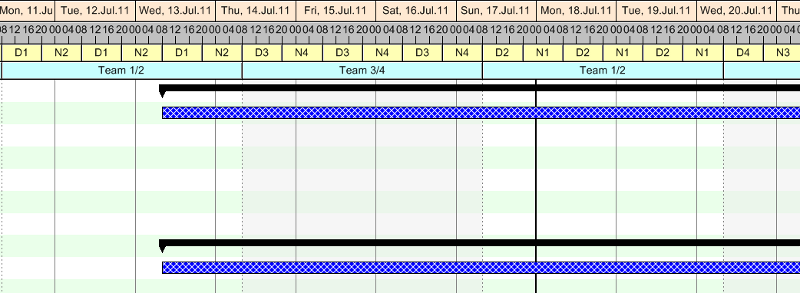
Imagine a security company that has watchmen, who continously care about some buildings. Lets assume, that a day consists of 2 shifts, 12 hours each, and that the company has 2 teams with 2 watchmen each. These people have a labour contract, that they have to work 36 hours within 6 days. In order to distribute the service times equally between the people, planning could be as follows.
- Starting at a Monday morning, 11.July.11, 8 o'clock, watchman 1 starts his work for 12 hours, then watchman 2 makes the night shift.
- After 3 days (Thursday, 14.July), the other team takes over and watchmen 3 and 4 cover the service.
After 6 days (Sunday, 17.July), the watchmen swap from day shift to night shift and vice versa. - After 12 days (Saturday, 23.July ), the cycle automatically repeats.
As you can see in the pictures, two "shift ribbons" are specified at the bottom of the time scale:
- The upper one shows, which PERSON works in each shift (D1 means watchman 1 makes the day shift, N2 means watchman 2 makes the night shift, a.s.o.)
- The lower one shows, what TEAM is responsible for the current 3 days.
Mainly, such calendars are used to display shift times in the time scale, as described. You can use shift calendars as working calendars for tasks, too. However, exceptions of the normal working cycle can only be implemented by adding deviating "intervals".
Interested in more Gantt chart tips? Here are
5 more Gantt Chart Best Practice Tips.
How to design a stylish tooltip
Three Steps to Add a Comfortable Sorting Option to Grouped Gantt Charts